Equipment Reference

Oxlife LIBERTY® & LIBERTY2® Portable Oxygen Concentrator

A quick reference for day-to-day use of your Oxlife LIBERTY — controls, power options, battery run times, and weekly cleaning. This page is a summary only. Always follow the manufacturer's full user manual and your physician's prescribed settings.
Safety essentials

Read before every use

  • Do not smoke when using this device. Keep all matches, lit cigarettes, candles and other sources of ignition at least 10 feet from the device.
  • Do not use the Oxlife LIBERTY without a battery installed.
  • Place the device in a well-ventilated area, free of smoke and away from direct sunlight.
  • Always use the manufacturer-supplied carry bag to protect the device from damage, and make sure the air intake ports are never obstructed.

Parts of the device

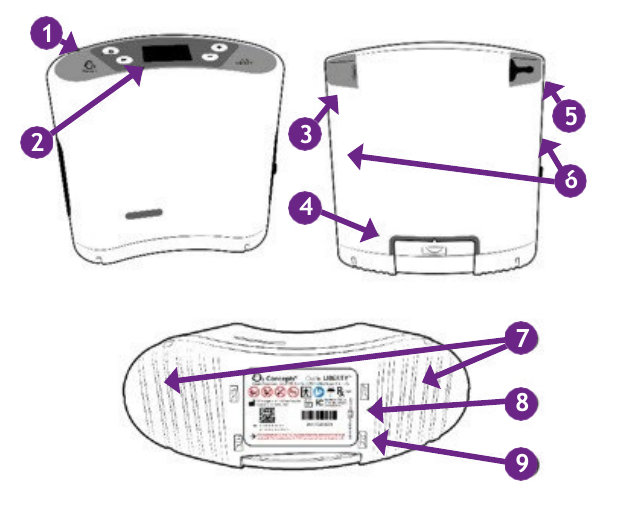
Front, side and bottom views of the Oxlife LIBERTY concentrator with nine numbered callouts identifying the control panel, LCD display, external power input, rechargeable battery, oxygen outlet port, air inlet ports, exhaust ports, serial number and FAA approval statement.
  1. Control panel
  2. LCD display
  3. External power input
  4. Rechargeable battery
  5. Oxygen outlet port
  6. Air inlet ports
  7. Exhaust ports
  8. Device serial number
  9. FAA approval statement

Turning it on & setting your flow

  • Power. Press and hold the power button to turn the device on or off.
  • Mode. Press the (M) button to select Continuous or Pulse flow mode.
  • Flow setting. Press the (+) or (−) buttons to select the setting prescribed by your physician or healthcare provider.

Your prescribed mode and setting come from your physician. Do not change them on your own — call us or your provider if something doesn't look right.
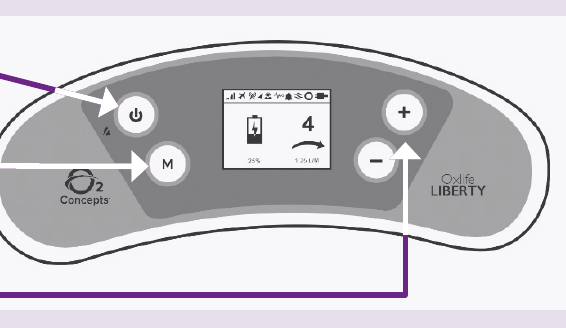
The Oxlife LIBERTY control panel showing the power button on the left, the M mode button below it, the LCD display in the center, and the plus and minus buttons on the right.
Oxlife LIBERTY control panel

Running on AC and DC power

AC power supply (wall outlet)

Connect the power supply to the Oxlife LIBERTY, then to the wall outlet. The external power source icon will appear on the control panel.

DC power cord (vehicle)

Connect the DC power cord to the Oxlife LIBERTY, then to the 12/15 volt DC outlet in the vehicle.

Always have the vehicle's engine running before plugging in your Oxlife LIBERTY.

Whenever you have a wall outlet or a vehicle outlet available, use it. Running on external power preserves your battery for the times you actually need it.

Battery: installing, removing & managing charge

Installing and removing

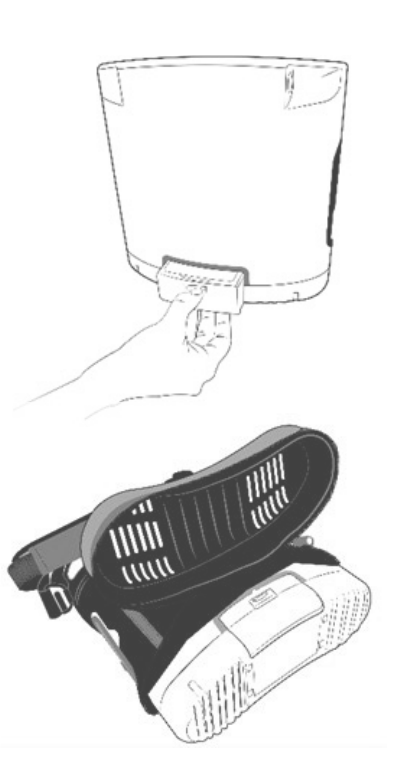
  • To remove: depress the button and slide the battery toward you.
  • To install: align the battery with the connector facing up to the device battery bay, then slide until it clicks into place.

Do not force the battery into place

The battery and/or device can be damaged if improperly aligned. If it doesn't slide in easily, back it out and re-align it.
Managing your charge

  • When connected to external power, a lightning bolt on the display indicates the battery is charging.
  • On battery power, once the charge drops to 30%, the remaining charge percentage is displayed.
  • Combining the battery, AC power supply and DC power cord lets you extend your time away from home. Use AC and DC power whenever possible to preserve battery life.
Illustration of a hand sliding the rechargeable battery out of the battery bay on the underside of the Oxlife LIBERTY, and a second view of the battery separated from the device.
Battery removal and installation

Typical battery operating times

Continuous flow mode
Setting (LPM) Operating time
0.52.25 hours
0.752.25 hours
1.01.75 hours
1.251.50 hours
1.51.25 hours
1.75 *1.00 hour
2.0 *0.90 hours
Pulse flow mode
Setting Operating time
13.00 hours
22.75 hours
32.50 hours
42.00 hours
51.75 hours
61.50 hours
71.30 hours
81.10 hours
91.10 hours
10 *1.00 hour

* Continuous mode settings 1.75 and 2.0, and pulse mode setting 10, are only available on the Oxlife LIBERTY2® device.

Operating times are based on a new, fully charged battery and are accurate to within ±10%.

Battery operating time will degrade with battery age, number of charge cycles and operating environment.

Weekly cleaning: the side vents

Clean the side vents once a week using these steps:

  • Remove the side vent.
  • Wash the side vent under warm running tap water using a mild detergent.
  • Rinse thoroughly.
  • Tap the side vent on a counter or hard surface several times to remove excess water, then blot with a paper towel to dry completely.
  • Reinsert it into the device.

Never use your Oxlife LIBERTY without the side vents installed.
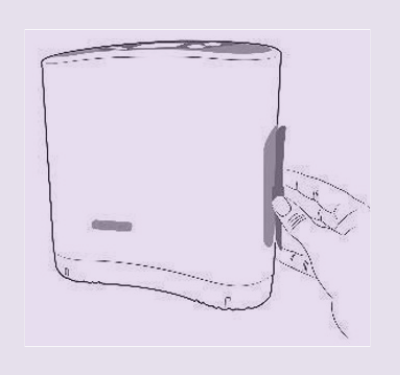
Illustration of a hand removing the side vent panel from the side of the Oxlife LIBERTY concentrator.
Removing the side vent

Download the printable guide

Keep a copy in your carry bag or with your travel documents.

This page is a convenience summary prepared by High Country Oxygen from the manufacturer's Quick Reference Guide (document 800-1090 Rev C). It is not a substitute for the complete user manual. For full instructions, warnings and specifications, refer to the manual supplied with your device or visit o2-concepts.com/products. Oxlife LIBERTY®, Oxlife LIBERTY2® and O2 Concepts® are trademarks of their respective owner. Never change your prescribed oxygen settings without direction from your physician.